Remote work has fundamentally changed the way people think about their computers. A laptop left at home, a server sitting in another city, or a desktop PC back at the office no longer needs to sit out of reach. With the right software, any of these machines can be accessed, controlled, and managed from virtually anywhere in the world. One name that comes up often in this space, particularly across Asia, is Sunflower Remote, developed by Oray, the trading name of Shanghai Best Oray Information Technology Co., Ltd. This China-based company has spent years building remote access tools that are now used by individuals, IT teams, and large enterprises alike. This article looks closely at what Sunflower Remote actually does, how the system works behind the scenes, who tends to use it, and where it fits into the wider landscape of remote desktop and remote control software.
What Is Sunflower Remote?
At its core, Sunflower Remote is remote control software that allows one device to access and operate another device over an internet connection. Instead of needing physical access to a computer, a user simply opens the Sunflower client, enters the right credentials, and from there can view the screen, move the mouse, type on the keyboard, transfer files, and run programs exactly as if they were sitting in front of the machine in person.
What sets Sunflower Remote apart from many regional competitors is the breadth of its platform support. The software works across Windows, Mac, Android, iOS, and Linux, which means users are not locked into a single ecosystem. It is entirely possible to control a Windows desktop from an iPhone, manage a Linux server from an Android tablet, or jump between a Mac and a Windows machine without switching tools. This kind of flexibility is one of the main reasons Sunflower Remote has found traction among IT professionals, gamers, designers, and everyday users who simply want reliable access to their own devices while away from their desks.
Beyond basic remote access, Sunflower Remote has grown into a broader remote management platform. Some versions of the software include support for monitoring device groups, organizing multiple machines under a single account, and integrating remote control directly into other business software, which has made it appealing to companies that need to manage fleets of devices rather than just one or two personal computers.
Key Features
Sunflower Remote packs in a fairly long list of capabilities, but a handful of features form the backbone of the product. The table below summarizes the most important ones.
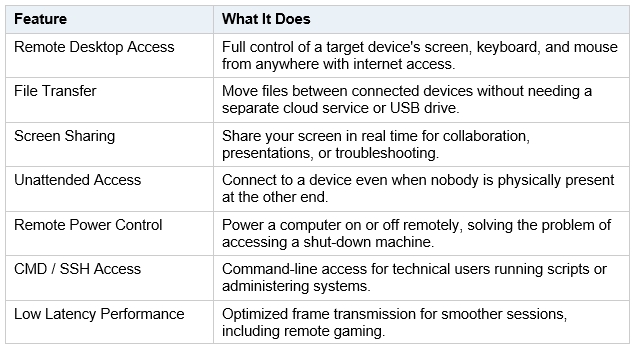
Beyond these core functions, Sunflower Remote has also introduced more specialized tools over various updates, such as mobile screen casting, where a phone's screen can be projected onto a connected computer, and group file distribution, which allows a single file to be pushed out to multiple connected devices at once. For users running remote game sessions, the software includes mouse and viewing-angle optimizations designed specifically to reduce the lag that typically makes remote gaming frustrating.
How It Works
Getting started with Sunflower Remote is fairly straightforward, even for people who are not particularly technical. The general process looks like this:
-
Install the client on both the device you want to control and the device you will be using to control it from.
-
Log in using an Oray or Sunlogin account, or connect directly through a generated device ID and password without creating a full account.
-
Enter the ID and password of the target device on the controlling device to request a connection.
-
Once the connection is authenticated, the remote session opens, giving live access to the other machine's screen, files, and system functions.
Because the platform is designed to behave consistently across operating systems, the connection process stays largely the same whether someone is linking a Windows PC to an Android phone or a Mac to a Linux server. This cross-platform consistency is part of what makes the tool approachable for casual users while remaining capable enough for IT professionals running more complex remote operations.
For unattended access, the setup is slightly different. The device that needs to be accessible without anyone present is configured in advance with a fixed password or account-based authentication, allowing it to be reached at any time, even if the screen is locked or no one is sitting at the desk. This is the setup most commonly used by IT support teams and businesses managing equipment remotely.
Use Cases
Sunflower Remote's flexibility means it shows up in a surprisingly wide range of real-world situations. Some of the most common include:
-
Work from home: employees can access their office desktop from home without needing to physically relocate hardware or configure a complicated VPN setup.
-
IT support teams: technicians can remotely diagnose and resolve issues on company devices without being on-site, cutting down on travel time and speeding up problem resolution.
-
Business device management: organizations running fleets of computers, point-of-sale systems, or kiosks can monitor and control them from a central location.
-
Personal PC access from mobile: individuals can check on or operate their home computer using nothing more than their phone, whether that means grabbing a forgotten file, restarting a stalled download, or checking that the machine is still running correctly.
-
Remote gaming and content access: some users rely on Sunflower Remote to access a more powerful home computer from a lighter laptop or mobile device while traveling, taking advantage of the low-latency optimizations built into the software.
It is also worth noting that several enterprise hardware makers, including names like Qualcomm, Ambarella, and Changhong, have reportedly integrated Sunflower's underlying remote control technology into their own products and services. This kind of adoption at the hardware and enterprise level gives a sense of how broadly the technology has spread beyond individual consumer use.
Benefits
A few reasons keep bringing users back to Sunflower Remote rather than switching to another tool:
-
Easy to use: the setup process is simple enough that even first-time users can get connected within a few minutes, without needing technical training.
-
Fast connection: performance updates over the years have focused heavily on reducing latency and improving frame quality during remote sessions, which matters for anything beyond basic file access.
-
Secure remote access: built-in authentication layers are designed to help keep unauthorized users out of connected devices.
-
Multi-device support: the same account can be used to manage and switch between several devices, which is convenient for anyone juggling more than one machine.
-
Wide platform compatibility: support across Windows, Mac, Linux, Android, and iOS means users are not restricted to a single operating system or device type.
Taken together, these benefits explain why Sunflower Remote has remained relevant for IT departments and individual users over an extended period, even as the broader remote desktop software market has grown more competitive.
Conclusion
Sunflower Remote, developed by Oray, has positioned itself as a genuinely cross-platform remote desktop tool, supporting Windows, Mac, Linux, Android, and iOS under one consistent system. With features like file transfer, unattended access, remote power control, command-line support, and a continued focus on reducing latency, it covers a wide range of needs, from IT professionals managing servers across multiple locations to everyday users who simply want quick access to their own computer from a phone.
In a world where remote work and distributed teams have become the norm rather than the exception, tools like Sunflower Remote highlight why remote control software has quietly turned into essential infrastructure rather than a niche convenience. Whether the use case is professional IT support, business device management, or personal access to a home PC, Sunflower Remote remains a tool worth understanding, and for many users, one worth relying on.
Media Contact
Company Name: Sunflower Remote
Contact Person: Media Relations
Email: Send Email
Country: China
Website: https://orayyb.com