For a Shopify clothing brand, Tapstitch, Printful and Printify offer different routes to a sellable product and a linked fulfillment order. Tapstitch is a candidate when its selected garment and branding conditions fit. Printful deserves consideration when its product and technique match and the seller wants its documented automatic or manual fulfillment settings. Printify is suitable for a seller prepared to manage a product-provider configuration and its approval process. The most useful comparison follows one product brief from selection to tracking, rather than declaring a winner from app installation.
Which POD Platform Fits Your Shopify Product Workflow?
A Shopify platform is a suitable choice when its product configuration and its order controls support how the store operates. A seller offering fixed graphics may want accepted orders submitted with little intervention; a seller approving personalized artwork needs a deliberate review step. Neither approach is improved by selecting an unsuitable garment simply because its app connects successfully.
Use three decisions in order: approve the garment and decoration, establish the variant link, and determine who authorizes production. Tapstitch's route-based branding, Printful's fulfillment controls and Printify's provider and approval choices create different maintenance tasks. The relevant platform is the one whose tasks the seller can perform consistently, including during a listing revision or a held order.
Keep the Product Brief Comparable
Use an illustrative product brief: a relaxed cotton graphic tee for US customers, a front illustration, two colors, a small size range and interior branding where the selected product supports it. This defines the intended purchase. It does not mean that each platform offers an identical blank or that a checkout test has already been completed.
Prepare one master artwork file and a record of the intended print dimensions. Keep the design content consistent while adapting the file to each selected product's requirements. If a platform needs a different preparation step, record that change. The useful comparison is how each route supports the same finished design, rather than whether every editor accepts the same unmodified file.
Select a garment candidate on each platform. Tapstitch's RT0086, Printful's AS Colour 5082 and Printify's Comfort Colors 1717 are documented examples, but they have different fits and finishes. Treat them as alternative implementations of a tee brief. For an exact-blank comparison, the seller would need a common supported model and matching variants. RT0086, AS Colour 5082, Comfort Colors 1717
Set the store conditions before comparing workflows: the same Shopify store, selling currency, destination and retail presentation. Use equivalent product roles and record the differences that remain. Product prices and shipping should follow the actual selected configurations, rather than whichever low entry figure appears on a catalog card.
For an account-based evaluation, preserve a record at each stage: selected garment, saved artwork, published variant, paid order, supplier acceptance and shipment. Each record answers a different question. A product successfully published to Shopify is evidence of publishing, not evidence of acceptable manufacturing or delivery.
Compare Product Setup and Publishing
The common sequence is to connect the store, create the product, publish its variants, inspect the Shopify listing and confirm the order route. The settings carrying those steps differ.
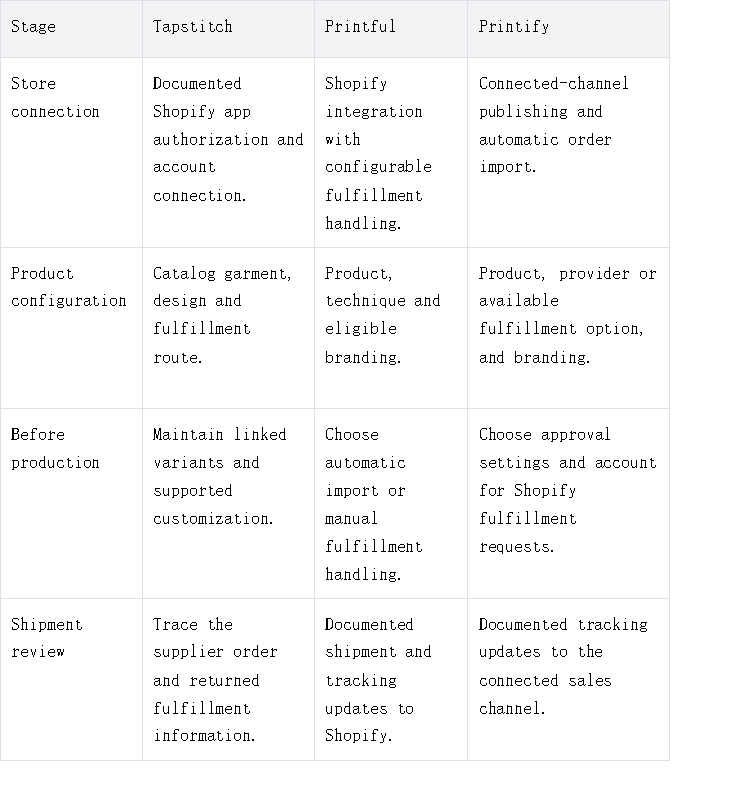
Sources: Tapstitch connection, Printful order processing, Printify integration.
Garment selection, design placement, and branding
For Tapstitch, the current publishing guide starts with selecting a catalog product, opening the design tool, placing artwork in the supported area and choosing a connected store. Publishing links the store's variants to the corresponding product and design. The important output is a correctly linked item, rather than a product image by itself. Tapstitch publishing guide
Choose the fulfillment route as part of that configuration. Tapstitch's custom-label service is limited to international fulfillment. A tee intended for US fulfillment should not be advertised with that service because a different route supports it. If the interior identity is essential, resolve the route before publishing. Tapstitch labels
For Printful, select the technique and placements offered for the exact product. If an inside label is required, its catalog filter and design options identify eligible garments. An appropriate product does not become fully configured until the selected graphic and required branding have been included. Printful inside labels
For Printify, provider or fulfillment-option selection belongs to the product build. The chosen route determines which supported branding features can be included. A neck-label feature listed elsewhere on the platform cannot be assumed to apply to the selected tee. Printify branding support
Use the finished product brief to judge the design configuration. Check the intended print scale, contrast and relationship to the garment's seams. The same graphic can look different on a relaxed garment-dyed body and an oversized faded body. That is a garment decision that the store page should accurately communicate.
Variants, listings, and shipping settings
Inspect the Shopify product as a customer would. The title should identify the garment clearly; the description should contain relevant fit, fabric and care information; the images should represent the saved design. Review each offered color and size, rather than approving the first thumbnail and assuming the rest follow.
The supplier model and Shopify variant need a stable connection. Keep an internal mapping of the store variant to its supplier garment, size, color and design revision. This is especially useful when the brand edits names or reorganizes the product page. A clearer customer-facing name should not obscure which item will be manufactured.
Tapstitch's guide explains that changes made directly in the store may not automatically appear in Tapstitch, and updates generally apply to new orders. The seller should therefore use a consistent update procedure and keep already-submitted orders separate from later artwork revisions. Product-update behavior
Review the retail calculation independently from the imported supplier cost. Include the complete decoration, delivery and branding costs, plus the store's own expenses. If a larger size or additional placement changes the supplier charge, the retail plan should accommodate it. A uniform customer price is a merchandising choice, rather than proof that every variant costs the same.
Shipping presentation also needs a customer-view check. Examine whether one-item and mixed-item baskets produce the intended charge and promise. A second garment may use a different route. The seller should not imply one parcel or one delivery date simply because the products appear together on the storefront.
Compare Order Syncing and Exception Handling
A live test should be a standard paid order for the configured product, followed through both Shopify and the supplier account. Record the store order, imported supplier order, production acceptance and eventual tracking. Do not treat a payment confirmation as evidence that the design has been accepted for production.
Printful's documentation distinguishes automatic import settings from manual requests. Its billing guide also explains that supplier fulfillment and shipping charges are separate from the customer's store payment. A test should confirm both the order route and the billing method that funds it. Printful fulfillment settings, Shopify billing
Printify documents automatic import followed by its approval settings. It warns that Shopify's Request fulfillment action can send an order to production regardless of those settings. For a seller relying on manual artwork review, staff behavior and approval settings must therefore agree. Printify order handling
Tapstitch documents automatic synchronization for linked products and a manual-sync path for eligible paid, unfulfilled orders. If an order is absent, the useful investigation begins with its payment status and product link, rather than immediately replacing the integration. The store order and supplier order should be reconciled before a second submission is made. Tapstitch order synchronization
When shipment occurs, distinguish tracking creation from carrier movement and delivery. Printful describes sending tracking to Shopify for each shipment, including split orders. Printify documents tracking updates through the connected sales channel. A real evaluation should check the customer's notification as well as the supplier dashboard. Printful Shopify tracking, Printify tracking flow
Include one deliberate variant check in the evaluation: select a different offered size or color and confirm its linked supplier configuration. This can reveal whether later listing edits preserved the product connection. Keep that check proportionate to the assortment rather than assuming a successful first variant approves every combination.
Choose the Platform That Fits Your Store Operations
Choose Tapstitch when the catalog garment is a strong match and the business can use its supported fulfillment and branding route. Its documented product-linking and update process should become part of the store's maintenance procedure. Choose Printful when the offered product and techniques match and its configurable fulfillment handling suits how the team reviews orders.
Choose Printify when selecting and maintaining a provider-specific configuration is useful to the business. Its approval flow can support deliberate order handling, provided staff understand how Shopify actions affect submission. The benefit depends on maintaining the actual configuration rather than viewing the catalog as a uniform production service.
The recommendation follows the product configuration and order controls the store needs. The final Shopify choice should join two approvals: the finished garment meets the collection brief, and a paid order follows the intended path without unwanted manual intervention. A platform that passes one of those decisions but fails the other is not yet ready for that store's launch.