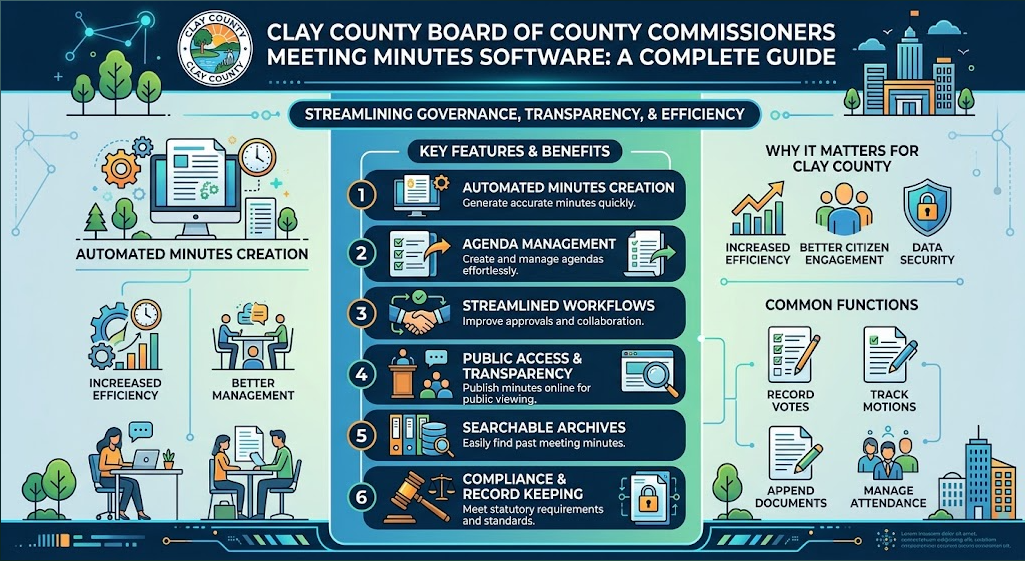
Finding a public meeting record should be simple. A resident may want to confirm a vote, check what was approved, download the official minutes, or compare the written record with the meeting video. That is why meeting-management software matters: it connects agendas, supporting documents, meeting actions, minutes, approvals, and public access into one workflow.
This guide looks specifically at the public-facing process around the Clay County Board of County Commissioners. The county confirms that BCC minutes can be viewed and downloaded through its Agendas and Minutes page, while its calendar and video archive provide additional context. The public pages reviewed do not identify the commercial vendor behind that system, so this article does not claim that a particular software company powers Clay County’s portal. clay county board of county commissioners meeting minutes software is therefore used here as a research phrase and internal link, not as a claim about the county’s current vendor.
What Clay County’s public meeting process looks like
Clay County provides a practical public-record workflow. Its official FAQ says residents can find upcoming agenda items on the Agendas and Minutes page and can view and download Board of County Commissioners minutes there. The county also says the BCC normally meets on the second and fourth Tuesday of each month at 4:00 p.m., unless otherwise noticed. Clay County BCC FAQ
The county calendar adds meeting date, time, location, and related public-notice information. For example, a 2026 BCC listing shows the meeting at the Administration Building, 477 Houston Street, Green Cove Springs, Florida, with the public invited to attend and be heard. Official Clay County meeting calendar
The historical side is important too. Clay County’s public-records page separates agenda and minutes records before June 2009 from the online agenda/minutes records from June 2009 to the present. That means a modern meeting system should not only publish current files; it should also make long-term retrieval and archiving practical. Clay County Public Records Search
What good meeting minutes software should do
Agenda and packet preparation
Staff should be able to create recurring meeting templates, add agenda items, attach reports, and route material through review without rebuilding documents by hand.
Meeting-day tracking
A clerk should be able to follow the agenda in order and capture motions, votes, speakers, and actions while the meeting is happening.
Minutes drafting and review
Structured meeting data can reduce retyping, but staff should still review the draft before it becomes the official record.
Public publishing
Residents should be able to locate agendas and approved minutes without searching through email attachments or unrelated files.
Search and archive
A useful system keeps old records discoverable and preserves the relationship between meetings, agenda items, attachments, and final minutes.
Permissions and audit history
Government teams need to know who changed a record, which version is current, and who is authorized to approve or publish it.
Accessibility and usability
Public records should be easy to open, read, search, and download on common devices and assistive technologies.
The Role of AI in County Meeting Minutes
Artificial intelligence is creating new ways to manage public meeting records. Modern tools can help organize meeting transcripts, summarize discussions, identify key decisions, and prepare draft minutes for staff review. For counties handling large volumes of public records, AI-powered workflows may reduce manual work while making information easier to find. However, human review remains essential to verify accuracy and ensure that official minutes reflect the actual meeting. Learn more about AI for county meeting minutes and how AI can support modern government recordkeeping.
Real government case: why the workflow matters
A useful comparison comes from Pinellas County, Florida. In a public success story about meeting and agenda modernization, IT Applications Developer Becky Batten described the previous manual process as "tedious, time consuming and expensive." The same case study reports that the county reduced approval time to about three weeks, a 75% reduction, after moving to a digital workflow. Pinellas County success story This is not a Clay County testimonial, but it is a useful real-world government example of the type of problem meeting software is designed to solve.
Another public-sector example is San Antonio, where public-information officer Moraima Mcgraw is quoted in the same software provider’s government case material as reporting a 66% reduction in average open-records request completion time while request volume increased sharply. Government operations case examples Again, this should be read as comparative evidence, not as a claim about Clay County’s internal workflow.
Public-site testing: what we verified on October 6, 2026
To keep the article grounded in observable evidence, the following checks were performed against Clay County’s public website on October 6, 2026:
• The county FAQ states that BCC meeting minutes can be viewed and downloaded through the Agendas and Minutes page.
• The FAQ states that, unless otherwise noticed, regular BCC meetings are held on the second and fourth Tuesday at 4:00 p.m.
• A 2026 meeting-calendar entry was reviewed to confirm the published meeting location and public-meeting information.
• The public-records page was checked to confirm the split between records before June 2009 and the June 2009-to-present agenda/minutes search.
• The county home page was checked for its public-facing Agendas and Minutes and Video Archives access points.
Important limitation: these checks test the public information experience, not Clay County’s internal staff software, back-office configuration, or procurement records. The public pages reviewed do not establish which vendor supplies the underlying meeting platform.
What a clerk or county administrator should test before buying
Start-to-finish test
Create a sample meeting, add an agenda item, attach a supporting document, route it for review, record a decision, create minutes, and publish the final record.
Search test
Try to find an older meeting using date, keyword, department, and document type. Search should still work after the record is archived.
Revision test
Change an agenda item after an earlier draft is approved. Verify version history and make sure users can identify the final version.
Public-user test
Open the published record as a normal visitor on desktop and mobile. Confirm that documents load, links work, and the path from meeting date to final minutes is obvious.
Records test
Confirm export, retention, permissions, backups, and audit-history options before treating the platform as a system of record.
How to evaluate software information online
When researching a meeting platform or any related digital workflow, do not rely only on a feature list. Check documentation, public case studies, release notes, accessibility information, security material, and examples of the actual user experience. A vendor’s latest Software Update page or product documentation can be useful for understanding what has changed, but it should be compared with your own testing checklist and the requirements of the government organization.
For broader software research, Toolsimpli can serve as another internal resource. The key is to keep the article’s subject clear: Toolsimpli is linked here for referral and software-resource traffic; this guide does not state that Toolsimpli is Clay County’s meeting-minutes vendor.
The value of meeting minutes software is not simply faster typing. A good system creates a dependable chain from agenda preparation to meeting actions, approved minutes, publication, search, and long-term access. Clay County’s public website already demonstrates the public side of that chain through its agendas and minutes service, meeting calendar, video access, and historical records guidance.
For counties evaluating technology, the best approach is to test the complete workflow with realistic records before choosing a platform. Look for accurate version control, clear approvals, searchable archives, accessible public documents, and a simple experience for residents. Those are the practical qualities that make a meeting-record system trustworthy.
Frequently asked questions
Does Clay County publish BCC meeting minutes online?
Yes. The county’s official FAQ says all Board of County Commissioners meeting minutes can be viewed and downloaded through the Agendas and Minutes webpage.
How far back can I search online?
The county says the online agenda/minutes records cover June 2009 to the present. Records before June 2009 are handled through its separate public-records search.
Does the public website identify the meeting-minutes software vendor?
Not on the public pages reviewed for this article. The site shows the public-facing record system, but that does not by itself identify the underlying commercial vendor.
Can software replace staff review of official minutes?
No. Software can structure and automate parts of the workflow, but authorized staff should review and approve the record before publication according to the organization’s procedures.
Editorial note: This article uses publicly available government pages and published case studies. Named users such as Becky Batten are cited as real-world examples from the referenced case study; no Clay County employee or ToolSimpli customer testimonial has been invented or implied.