FORT WORTH, TX / ACCESS Newswire / October 26, 2026 / Vadzo Imaging, a provider of embedded vision camera products for OEMs and system integrators, today announces validation of LI-HDR and eDR on the Falcon-830CRH, a 4K HDR Autofocus USB 3.2 Gen 1 Camera built on the Onsemi HyperLux LP AR0830 sensor. Part of Vadzo's USB camera portfolio, the Falcon-830CRH combines VCM autofocus, two dynamic range modes, wake on motion, and an on-board high-performance ISP in a UVC-compliant module. With this validation, Vadzo presents a 4K LI-HDR eDR MIPI Camera for security and surveillance, retail automation, and kiosk and digital signage systems, together with guidance on how autofocus, exposure, and wake on motion behave together.
Why Autofocus, Auto Exposure, and Wake-Up Matter in 4K HDR Autofocus USB 3.2 Gen 1 Camera
A camera that watches people has to get three things right at once. It must be in focus, it must be correctly exposed, and it must be ready. Each is a control loop, and each takes time. Autofocus moves a lens and measures sharpness until the picture settles. Auto exposure adjusts exposure and gain until brightness is suitable. When the camera has been resting to save power, a third step comes first, which is waking up. A camera that handles each step well in isolation can still lose the first moments of an event if the steps run one after another. The loss is easy to miss in a demonstration and obvious to the person standing at the kiosk.
Light makes the loops harder. A kiosk beside a window, a store entrance at noon, and a gate facing the sun all contain bright and dark regions in the same frame. A standard exposure clips one or buries the other, and the autofocus system needs visible contrast to work with. If the subject sits in shadow or the background washes out, focus can hunt. High dynamic range modes help by keeping detail in both bright and dark regions, but they come in different forms. Some combine exposures taken one after another, which can ghost moving subjects. Others interleave exposures within one frame, which avoids that at some cost in vertical detail. The right choice depends on the scene and on how much motion it contains.
Distance varies as well. People approach a kiosk and lean in, shoppers stop at different points along a shelf, and visitors reach a gate at different times. A fixed focus lens is sharp at one distance and soft at the rest. Autofocus fixes that, but only if the lens, the actuator, and the focus algorithm are matched, and only if the module keeps working when HDR is active. A camera that advertises autofocus and HDR separately leaves the integrator to learn how they behave together. Honest guidance on the combination is worth more than a longer feature list.
Teams that discover slow focus or poor first frames after installation must tune thresholds, lenses, and software on site, which is slow and costly across many positions. A short pilot at the real site, at several times of day, avoids most of that effort.
How 4K HDR Autofocus USB 3.2 Gen 1 Camera Coordinates Autofocus, HDR, and Wake on Motion
The Falcon-830CRH is built on the Onsemi HyperLux LP AR0830, an 8MP color rolling shutter sensor with 4K (3840 x 2160) output. The LP in the family name stands for low power. The sensor offers line-interleaved HDR, enhanced dynamic range, a super-low-power mode, and wake-on-motion, and its line-interleaved HDR can extend dynamic range up to 140dB. The module adds an M12 standard (S-Mount) lens with VCM autofocus. A voice coil motor moves the lens electrically and quickly, so focus can follow a subject without manual adjustment. Vadzo has validated both dynamic range modes on the module. The 4K frame also leaves room to crop to a region of interest while keeping useful detail.
The two modes serve different scenes. Line interleaved HDR, or LI-HDR, alternates exposure settings across the rows of a single frame and combines them. Because the exposures are captured in the same frame, a moving subject does not ghost the way it can with exposures taken one after another, and the trade-off is a small loss of vertical detail. Enhanced dynamic range, or eDR, is a lighter mode for scenes of moderate contrast, such as an interior with window light. Teams should record the real scene in each mode and compare. They should also check focus speed with the chosen mode active, since the sharpness measure that autofocus relies on comes from the combined image. Recording a short sequence of a person approaching in each mode shows quickly whether focus stays steady.
The on-board high-performance ISP finishes the picture inside the module. It converts raw sensor data into a processed color image and applies auto exposure and auto white balance, so the host receives a finished frame. Wake on motion lets the module rest at very low power and return to capture when the scene changes. The sequence after a wake matters. The sensor must resume, exposure must converge, and focus must settle. HDR helps the second step, since a frame that spans a wide range of brightness is less likely to be fully clipped or fully dark while exposure is still converging. Teams can shorten the third step by starting from a sensible focus position, such as the usual standing distance, and by keeping the motion threshold tuned so the camera is not woken by shadows. A sensible default focus position also helps when several people arrive in quick succession.
The module connects over USB 3.2 Gen1 with UVC compliance, so Windows and Linux hosts can open it without a proprietary driver, and a single cable carries data and power. The M12 standard mount accepts a wide range of lenses, which lets teams choose the field of view that suits a kiosk bezel, a store entrance, or a gate. Cable length matters, since passive USB cables work reliably only over short runs, and installations farther from the computer should use an active extension. Vadzo helps teams plan these details and confirm frame rates and power figures against the product documentation. Teams should also check the operating temperature for outdoor and window-facing positions.
It helps to think of the wake sequence as a budget of time and to spend it deliberately. The first part is the wake itself, which depends on how the host resumes the USB link and starts the stream. The second is exposure, which converges quickly when the scene resembles the one the camera saw last, and which HDR makes more forgiving. The third is focus, which settles quickly when the lens starts near the right position. A design can improve each part. Keeping the host from sleeping too deeply shortens the first. Storing the last exposure and applying it at wake shortens the second. Parking the lens at the usual standing distance shortens the third. None of these tricks changes the sensor or the lens, and all of them are settings in the application, so teams can try them in an afternoon. The result is a camera that delivers a usable frame soon after motion begins, which is what a kiosk, a shop, or a gate actually needs.
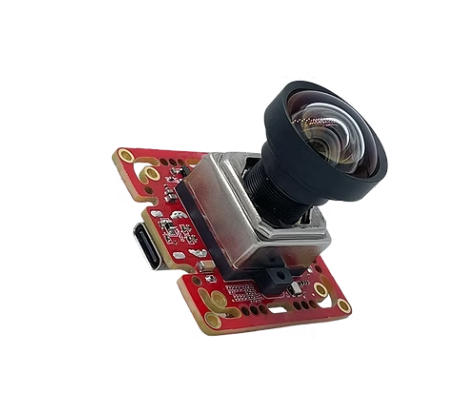
Product Overview
The Falcon-830CRH is an 8MP color USB module built on the Onsemi HyperLux LP AR0830 sensor and validated for LI-HDR and eDR. As an 8MP VCM Autofocus USB Camera, it focuses automatically on subjects at different distances, and as a 4K Wake-on-Motion USB Camera, it rests between events and resumes capture when the scene changes. The AR0830 Super Low Power USB Camera designation reflects the sensor's super low power mode, and the 4K AE AWB USB Camera designation covers automatic exposure and white balance inside the ISP. The module combines the sensor, the ISP, and a USB 3.2 Gen1 controller with an M12 standard lens and VCM autofocus. It also serves as an 8MP LI-HDR USB 3.2 Gen 1 Camera, an AR0830 eDR USB 3.2 Gen 1 Camera, and a 4K Line Interleaved HDR USB Camera, and an 8MP Enhanced Dynamic Range USB Camera for designs that need a standard interface.
Key specs: 8MP 4K (3840 x 2160) Max Resolution | Onsemi HyperLux LP AR0830 Sensor | Color with Rolling Shutter | USB 3.2 Gen1 Interface | M12 Standard (S-Mount) Optics with VCM Autofocus
Key Capabilities of the 4K HDR Autofocus USB 3.2 Gen 1 Camera
M12 Lens with VCM Autofocus for Flexible Focusing
The module carries an M12 standard (S-Mount) lens holder with voice coil motor autofocus. The M12 format keeps the optics small and lets integrators choose among many lenses, while the voice coil motor moves the lens quickly and electrically, with no manual adjustment after installation. People stand at different distances from a kiosk, a shelf, or a gate, and an autofocus camera follows them, whereas a fixed lens is sharp at one distance only. Teams should test focus speed and repeatability at the real working distances, including the closest and farthest positions a visitor might take, and they should confirm the focus range against the product documentation. A test chart or a printed face at several distances makes the check quick.
Line-Interleaved HDR for High-Contrast Scenes
Line-interleaved HDR alternates exposure settings across the rows of one frame and combines them, so bright and dark regions are captured together. Because the exposures share a frame, moving people do not ghost the way they can with sequential exposures, and the cost is a small loss of vertical detail. As a 4K Line Interleaved HDR USB Camera, the module suits entrances facing the sun, kiosks beside windows, and gates at dusk. Vadzo has validated the mode on the module, and teams should test it with their own scenes. Recording the same doorway at noon and at dusk gives a fair comparison.
Enhanced Dynamic Range (eDR) for Moderate-Contrast Scenes
Not every scene needs the widest range. Enhanced dynamic range, or eDR, is the sensor's lighter mode for scenes of moderate contrast, such as a lit interior with some window light. It widens the range without the trade-offs of the most aggressive mode, which makes it a sensible default for many kiosks and shops. Teams can switch between eDR and line interleaved HDR in software, so a site can use eDR by day and a stronger mode where the contrast demands it, and a fleet of units can share one configuration file for each type of position. The mode can be changed later, so a team can start with the lighter option.
Wake on Motion for Low-Power Camera Operation
Wake on motion lets the module rest at very low power and return to capture when the scene changes. This extends battery life, reduces heat in sealed enclosures, and lowers energy use at sites with limited power. Waking, converging exposure, and settling focus happen in sequence, so teams should measure the whole chain on the target host. An 8MP Wake-on-Motion USB Camera should also have its threshold tuned at the real site, since shadows and passing lights can cause false wakes. As a 4K Super Low-Power USB Camera, the module spends energy only when there is something to see. Sites that run on limited power gain the most from that behavior.
Onboard High-Performance ISP with Auto Exposure and Auto White Balance
The on-board image signal processor turns raw data into a finished color image inside the module and applies auto exposure and auto white balance. The host receives a processed frame and does not spend its own capacity on those steps, which suits compact kiosk and store computers. An AR0830 Auto White Balance USB Camera of this kind keeps colors neutral as lighting shifts between daylight and artificial light, and a 4K Auto Exposure USB Camera keeps brightness suitable as the day changes. Manual control remains available for teams that prefer fixed values. Starting with the automatic settings is usually the fastest route to a working prototype.
USB 3.2 Gen 1 Integration and UVC Compatibility
The module connects over USB 3.2 Gen1 and enumerates as a UVC device on Windows and Linux with no proprietary driver, so it works as a 4K HDR USB 3.2 Gen 1 Camera Module and a 4K High Dynamic Range USB Camera Module in compact computers. As an AR0830 USB 3.2 Gen1 Camera with an M12 standard mount, it accepts many lenses. As an 8MP USB 3.2 Gen 1 Camera Manufacturer, Vadzo supports lens matching, firmware customization, and enclosure design for volume programs. Teams moving from a bench test to a pilot keep the same module and documentation.
"Customers at kiosks, stores, and gates asked for the same thing. They wanted the camera to be ready, sharp, and correctly exposed from the first frame. The Falcon-830CRH was validated with that in mind. The autofocus follows people at different distances, LI-HDR and eDR keep bright doors from washing out the scene, and wake on motion lets the camera rest between events. We are also open about how these features interact. After a wake, exposure and focus both need a moment, so we encourage teams to measure the whole sequence on their own hardware. A few days of testing at the real position usually answers more questions than any specification, especially when the test covers both a bright afternoon and a dim evening." - Alwin Vincent, Product Manager, Vadzo Imaging.
Real-World Applications of 4K HDR Autofocus USB 3.2 Gen 1 Camera
Security Monitoring in High-Contrast Lighting Conditions
Entrances, gates, and perimeters combine bright backgrounds, dark interiors, and subjects at changing distances. The Falcon-830CRH works as a Smart Security USB Camera that keeps visitors sharp and correctly exposed, and as a Security Surveillance USB Camera, it rests with wake on motion until someone arrives. As a Power Efficient Security USB Camera, it suits sites with limited power, where a camera that sleeps between events saves energy. Installers should tune the motion threshold to avoid false wakes from shadows and passing lights, and they should repeat the tuning after any change in lighting or signage near the camera. Gate and entrance camera units also benefit from a lens chosen for the usual standing distance.
Retail Monitoring with Autofocus and Dynamic Range Control
Stores combine window glare, bright displays, and shoppers who stop at different distances from a shelf or a counter. The module serves as a Retail Store USB Camera whose autofocus follows shoppers and whose eDR mode keeps entrances and displays readable. Wake on motion lowers the energy use of units that watch quiet aisles, and a short test in the real store settles which dynamic range mode suits each position. A 4K AE AWB USB Camera also keeps product colors steady as store lighting changes between daylight and artificial light. Chains that standardize one module simplify spares and training across stores.
Kiosk Imaging for Face and Document Capture
Kiosk users approach, lean in, and hold up documents or phones, so the distance to the camera changes during one visit. The camera functions as a Kiosk USB Camera that keeps faces and documents sharp across that range, with HDR modes that handle a bright window or entrance behind the user. A standard USB connection and an M12 standard mount simplify integration into enclosures. Smart Security USB Camera and Kiosk USB Camera designs share the same module, so a maker that builds both can keep one part number. Kiosk makers can also keep one camera across product lines and change only the lens.
Frequently Asked Questions
Q: Does HDR slow down autofocus?
A: Vadzo Imaging explains that autofocus relies on a measure of sharpness taken from the image, and HDR changes how that image is built. In some modes, the combined frame is a little different from a normal one, so focus speed can change. The effect depends on the mode, the lens, and the scene. Vadzo Imaging recommends testing focus speed with the chosen HDR mode active, at the real working distances, with real subjects, since the result depends on the lens and the scene. A 4K AE AWB USB Camera that settles exposure quickly also gives the focus system a steadier image to work with.
Q: How can a camera focus quickly after waking on motion?
A: After a wake, the sensor must resume, exposure must converge, and focus must settle, and a Smart Security USB Camera that rests between events has to repeat that chain every time. Teams can shorten the sequence by starting from a sensible focus position, such as the usual standing distance, and by using an HDR mode that tolerates imperfect exposure in the first frames. Tuning the motion threshold keeps the camera from waking for shadows. Vadzo Imaging suggests measuring the whole chain on the real host, since it depends on the host as well as the camera, and a short trial usually gives a clear answer.
Q: When should a kiosk use LI-HDR instead of eDR?
A: Use line interleaved HDR when the scene has extreme contrast, such as a kiosk facing a bright window or a sunlit entrance behind the user. It interleaves exposures within one frame, which avoids ghosting on moving people, and it costs a little vertical detail. Use enhanced dynamic range for moderate contrast, such as an interior with some window light. A 4K LI-HDR eDR Camera lets teams switch in software, and Vadzo Imaging recommends recording the real scene in each mode, since the best choice depends on the site.
Q: Why does a kiosk or store camera need autofocus if customers stand in one place?
A: People rarely stand still or at exactly the same distance. They approach, step back, lean in, and hold documents or phones at different heights. A fixed focus lens is sharp at one distance only, so many positions give a soft image. An 8MP VCM Autofocus USB Camera follows the subject and brings it into focus, which reduces retries and failed reads. Vadzo Imaging recommends testing focus speed at the real position before fixing the enclosure design, because the best lens depends on the usual standing distance.
Q: Why should integrators choose Vadzo Imaging as their 8MP USB 3.2 Gen 1 Camera Manufacturer?
A: Vadzo Imaging offers more than a camera module built around a capable sensor. Integrators working with Vadzo Imaging receive a module validated for LI-HDR and eDR, with voice coil autofocus, wake on motion, and an on-board high-performance ISP, along with candid guidance on how focus, exposure, and wake behave together, plus engineering support for lens selection, firmware customization, and enclosure design. Vadzo Imaging maintains evaluation kits with no minimum order requirement, so teams can test on their own hardware before committing to volume production.
Availability
The Falcon-830CRH 4K HDR Autofocus USB 3.2 Gen 1 Camera built on the Onsemi HyperLux LP AR0830 sensor is available now for evaluation and production orders. Evaluation kits include the camera module, an M12 lens, a USB 3.2 Gen1 cable, and platform documentation, with no minimum order requirement. Teams can test autofocus speed with each HDR mode, measure the time from wake to a usable frame, and tune the motion threshold at their own site before committing to a production bill of materials, which tells them more than a datasheet comparison alone. Teams that need a different lens can ask Vadzo to review the configuration. Browse the full range of USB camera options at Vadzo's website or contact Vadzo at support@vadzoimaging.com to request an evaluation unit or discuss OEM integration requirements for security, retail, and kiosk programs.
About Vadzo Imaging
Vadzo Imaging is a global provider of embedded vision solutions and delivers high-performance camera technologies and imaging platforms for applications in robotics, industrial automation, UAVs, edge AI, and medical systems. Its products are designed for seamless integration with leading embedded platforms. Vadzo supports customers through hardware customization, firmware development, and module-level drivers, enabling faster development and deployment of vision-based systems across USB, MIPI, GigE, Wi-Fi, and SerDes camera interfaces.
Media Contact
Alwin Vincent
Vadzo Imaging
Email: alwin@vadzoimaging.com
LinkedIn: Vadzo Imaging
YouTube: Vadzo Imaging
X: Vadzo Imaging
SOURCE: Vadzo Imaging
View the original press release on ACCESS Newswire