You want to make content that grabs attention and keeps people watching. Most creators start by using one tool for pictures and another for videos. You might feel like these two worlds are separate, but they work much better when you use them together. Combining AI image and video tools allows you to build a consistent look for your brand without spending thousands of dollars on equipment.
You can use these tools to create professional videos from simple ideas by starting with a high quality static image. When you have a clear picture as a starting point, the AI has a better map to follow. This leads to smoother movement and more realistic results in your final video files. It is a smart way to work because it gives you more control over the visual style from the very first second.
Many people struggle to get the exact look they want when they type a prompt into a video generator. Video AI sometimes gets confused if the prompt is too complex. By creating an image first, you set the scene, the lighting, and the characters. You essentially give the video tool a high resolution reference to animate. This method saves you time and reduces the number of failed attempts you might have otherwise.
You can also generate videos for different creative projects by using a series of images as a storyboard. Instead of guessing how a scene will look, you can generate five or six images that show the progression of your story. Once you are happy with the still shots, you can turn each one into a short video clip. This ensures that your characters and environments stay the same throughout the entire production.
Using these two technologies together helps you bridge the gap between a static post and a full cinematic experience. You do not need a film crew or a massive studio to produce high quality content. You just need a solid plan and the right set of AI tools to bring your vision to life. This approach is becoming the standard for modern digital marketing and personal storytelling.
Scenario 1: Social Media Marketing Campaigns
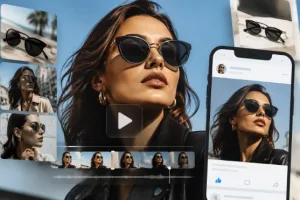
Social media managers often need to produce a lot of content in a very short amount of time. If you are running a campaign for a new clothing line, you can start by generating AI images of models wearing specific styles. These images can be used for Instagram grid posts or Pinterest pins. However, static images often get less engagement than video content on platforms like TikTok or Reels.
To solve this, you can take those same AI generated images and put them into a video generator. You can add subtle movements like hair blowing in the wind or the model turning their head. This creates a thumb stopping effect that looks much more expensive than it actually is. You are not just posting a photo, you are posting a living portrait that feels premium and polished.
This workflow also helps with brand consistency. If you use the same seed or style reference for your images, your videos will match perfectly. You can create a whole week of content in a single afternoon. By mixing these formats, you keep your audience interested because they see a variety of media that all feels like it belongs to the same brand story.
Scenario 2: E-commerce Product Demonstrations
Selling products online requires trust and clarity. Customers want to see how a product looks in a real environment. If you have a small business, you might not have the budget for a professional photoshoot in a luxury home. You can use AI image generators to place your product in any setting you can imagine. You can put a coffee mug on a wooden table in a sunlit kitchen or a pair of shoes on a mountain trail.
Once you have these beautiful images, you can use AI video tools to show the environment coming to life. You can animate the steam rising from the coffee or the clouds moving behind the mountain. This adds a layer of realism that static images simply cannot provide. It helps the customer visualize the product in their own life, which often leads to higher conversion rates.
This use case is perfect for testing different marketing angles. You can generate one image of your product in a modern office and another in a cozy bedroom. Then, you can turn both into videos to see which one performs better with your audience. It is a low cost way to do high level market research while creating professional assets at the same time.
Scenario 3: Educational and Explainer Content
Teachers and online creators often have to explain difficult concepts that are hard to film. If you are talking about ancient history or space travel, you cannot just go out and record footage. You can use AI to generate accurate and detailed images of these subjects. An image of a Roman forum or a futuristic Mars colony can serve as the perfect visual aid for your lesson.
By animating these educational images, you make the learning process much more engaging. A static picture of a planet is fine, but a video of that planet rotating with stars moving in the background is much better. It holds the attention of students and helps them remember the information. You can create a documentary style feel without needing a library of expensive stock footage.
This method also allows you to customize the visuals to fit your specific script. If your lesson mentions a specific type of architecture, you can generate an image that shows exactly that. Then, you can use video AI to pan across the building as you explain its features. It makes your educational content feel like a high budget production, which builds your authority as an expert in your field.
Benefits per Scenario
The following table shows how combining these workflows helps in different areas of content creation.
| Scenario | Primary Benefit | Key Outcome |
| Social Media | Higher Engagement | More likes and shares |
| E-commerce | Increased Trust | Better sales numbers |
| Education | Better Retention | Improved student focus |
| Personal Branding | Visual Unity | Stronger brand identity |
| Small Business | Cost Savings | Professional look for less |
In social media, the main benefit is the ability to stand out in a crowded feed. People are used to seeing static images, so a moving AI portrait catches the eye. In e-commerce, the benefit is the ability to create lifestyle content without a physical set. This saves money and time while making the product look more appealing. For educators, the benefit is clarity. Complex ideas become easier to understand when they are paired with high quality, moving visuals.
Practical Workflow for Combining Tools
If you want to start using this combined workflow, you should follow a logical path to get the best results. Start by defining your visual style. You should decide on the colors, the lighting, and the overall mood of your project. Once you have a clear idea, you can move into the generation phase.
First, use an AI image generator to create your base visual. Spend time refining your prompt until the image looks exactly how you want it. It is much easier to fix a static image than it is to fix a video. Make sure the composition is clean and the main subject is clear. This image will act as the foundation for everything that comes next.
Second, take your finished image and upload it to an AI video tool. Most modern video generators have an image to video feature. You can often specify what parts of the image you want to move. For example, you can tell the AI to keep the person still but make the background move. This gives you a high level of control over the final output.
Third, generate several variations of the video. AI can be unpredictable, so it is a good idea to create three or four versions of the same clip. You might find that one version has smoother movement while another has better lighting. You can then pick the best one or even edit parts of them together.
Finally, bring your video clips into a standard video editing program. This is where you add music, voiceovers, and text overlays. The AI provides the raw footage, but your editing provides the story. By following this workflow, you ensure that your final product is professional, consistent, and engaging.
Conclusion
Combining AI image and video workflows is a powerful way to create content. It allows you to take a simple idea and turn it into a high quality video that looks like it was made by a professional studio. By starting with a static image, you gain more control over the visual style and reduce the time spent on trial and error.
This approach works for everyone from social media influencers to small business owners and educators. It levels the playing field, giving anyone with a computer the ability to produce stunning visuals. You can save money on expensive equipment and photoshoots while still reaching your marketing or educational goals.
As you get more comfortable with these tools, you will find even more creative ways to mix them. The technology is always improving, making it easier to bring your imagination to life. Start experimenting with your own image and video combinations today to see how they can transform your content strategy. Focus on the story you want to tell, and let the AI help you show it to the world in the best possible light.